
Most people grab the panel cable and push it into the first port they see. That is where installs go wrong, because Ring cameras use two different connectors. To plug a solar panel into a Ring camera, mount the panel in open sunlight, then connect its cable to the camera’s charging socket, using the USB-C-to-barrel-plug adapter if your camera has a barrel port. Check compatibility first, since a few older models do not work with the current panel.
Quick answer
Find your camera’s charging port. If it is USB-C, plug the panel cable straight in. If it is a barrel plug, attach the included adapter first, then tighten the side screws. Confirm the result in the Ring app.
- Best for newer cameras: direct USB-C connection, no adapter
- Best for older battery cameras: the included barrel adapter
- Ring’s current USB-C Solar Panel works with USB-C cameras directly and with several barrel-plug cameras through an adapter.
- The first-generation Outdoor Cam and Stick Up Cam are not compatible with this panel.
- Push the connector in fully and secure barrel plugs with their side screws.
- Face the panel south and angle it about 45 degrees. Keep it free of shade.
- Check charging status in the Ring app after you finish.
- Which Ring cameras are compatible with the USB-C Solar Panel?
- Where do you plug the solar panel into a Ring camera?
- Do you need an adapter to connect the panel to a Ring camera?
- How do you connect a solar panel to a Ring camera?
- Worked examples
- How much direct sunlight does the Ring solar panel need?
- What should you check if the camera is not charging?
- What do owners say?
- Frequently Asked Questions
Which Ring cameras are compatible with the USB-C Solar Panel?
Per Ring’s USB-C Solar Panel product page, the panel works with several current USB-C cameras and some older barrel-plug ones. Look up your exact model before you climb a ladder.
| Connection type | Cameras | Adapter needed? |
|---|---|---|
| USB-C | Outdoor Cam Plus, Stick Up Cam Pro, Spotlight Cam 2nd Gen, Spotlight Cam Plus, Spotlight Cam Pro | No |
| Barrel plug | Outdoor Cam Battery 2nd and 3rd Gen, Spotlight Cam Battery and Solar | Yes, the included USB-C-to-barrel-plug adapter |
| Not compatible | First-generation Outdoor Cam, first-generation Stick Up Cam | Adapter does not help |
Many guides skip that last row. Ring states the current panel does not work with those first-generation cameras, so an adapter will not fix it.
Where do you plug the solar panel into a Ring camera?
You plug it into the camera’s charging socket, the same port used to charge the battery by cable. On many battery cameras it sits behind a small weather cover. Open it and look at the shape.
Does the Ring camera use a USB-C connector or a barrel plug?
It depends on the model. A USB-C port is small, flat and oval. A barrel port is a round hole, and its plug often has screw holes on both sides. Match the port to the table above. Newer cameras use USB-C. Older battery models use the barrel style.

Do you need an adapter to connect the panel to a Ring camera?
Only for barrel-plug cameras. The panel itself ends in USB-C. Ring includes a USB-C-to-barrel-plug adapter for older models, according to its USB-C Solar Panel (2nd Gen) install guide.
- Plug the adapter’s USB-C end into the panel cable.
- Push the barrel end into the camera’s round port.
- Tighten the screws on both sides of the barrel plug.
Those side screws matter. A plug that only sits in the port can work loose in wind and cause charging to drop in and out.
How do you connect a solar panel to a Ring camera?
Follow this checklist in order. It covers the steps that general guides often skip.
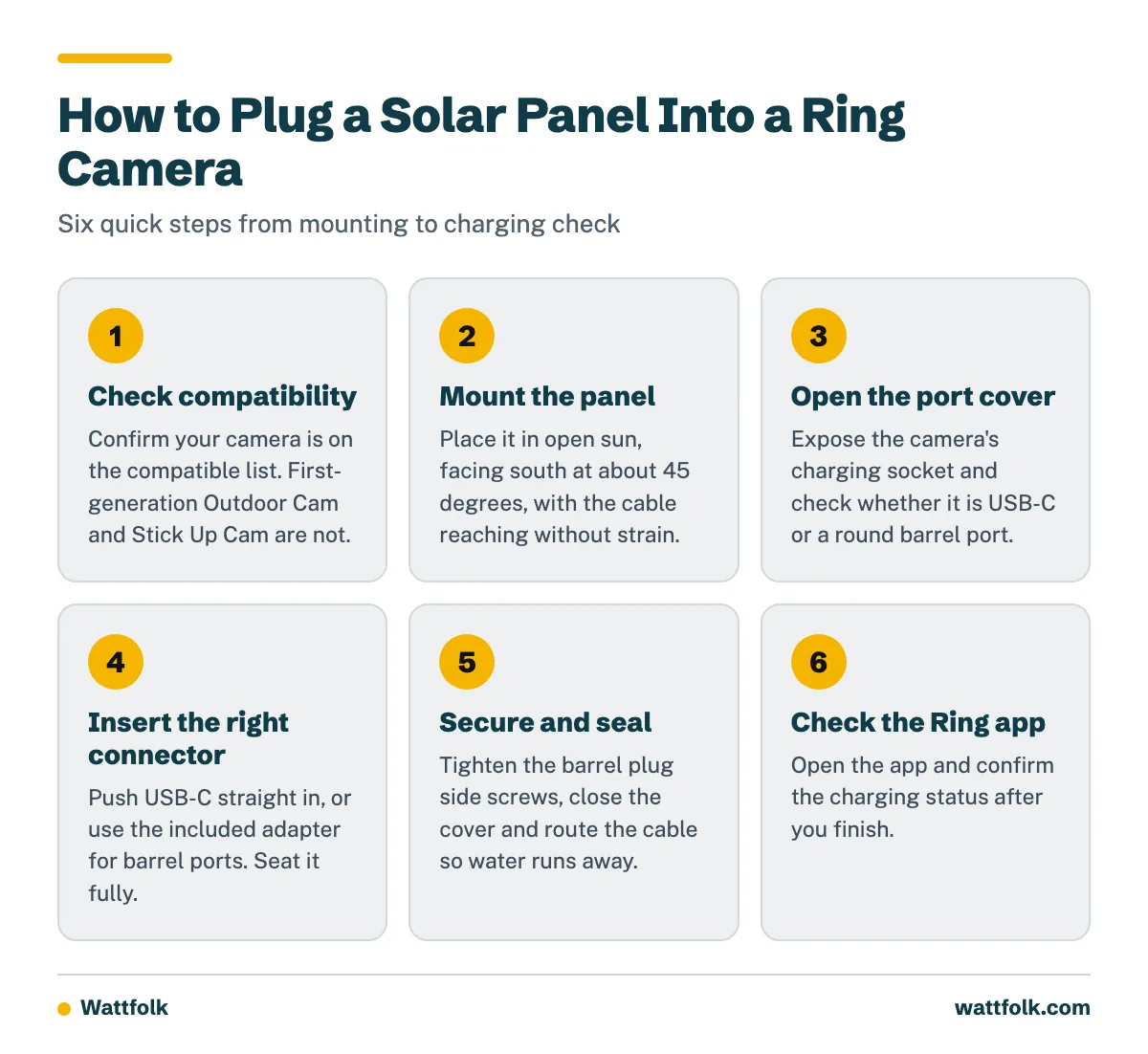
- Confirm your camera is on the compatible list.
- Remove the battery or power down if your model’s guide calls for it.
- Mount the panel first, in open sun, with the cable reaching the camera without strain.
- Open the camera’s port cover to expose the charging socket.
- Insert the correct connector fully: USB-C straight in, or the adapter for barrel ports.
- Secure barrel plugs with the side screws.
- Close or seal the cover and route the cable so water runs away from the port.
- Open the Ring app and check the charging status.
Do not join extra cords to stretch the cable. Use only the cable and adapter supplied. If your mounting spot needs wiring beyond that, or any work on your home’s electrical system, hire a licensed electrician.
Worked examples
How do you connect a solar panel to a Ring Camera Plus?
Take a Spotlight Cam Plus, which uses USB-C. Mount the panel on a south-facing wall or eave. Run the cable to the camera and open the port cover. Push the panel’s USB-C plug in until it seats fully. Close the cover and check the Ring app. No adapter is involved.
From the Shop
Barrel-plug camera example: a Spotlight Cam Battery uses the round port. Attach the included adapter to the panel cable, push the barrel end into the camera, and tighten both side screws. Then give the cable a gentle tug. If the plug holds, route the cable and recheck. Based on the install guidance, loose barrel plugs are an easy mistake to make.

How much direct sunlight does the Ring solar panel need?
Ring’s support guidance says best performance can require at least 2 to 3 hours of direct sunlight per day. Other Ring installation guidance recommends a minimum of 4 to 6 hours. Treat 2 to 3 hours as the low end and 4 to 6 hours as a stronger target for reliable charging. Busy cameras draw more power, so more sun helps them.
- Direction: Ring recommends facing the panel south in the Northern Hemisphere, which covers the entire US.
- Angle: Aim for about 45 degrees toward the sky.
- Clear view: Keep branches, eaves and walls from shading it. Even partial shade can cut charging.
Peak sun hours vary by state and season, so a shaded porch in winter will charge less than an open roof edge in summer.
What should you check if the camera is not charging after installation?
Work through these in order:
- Camera not on the compatible list? Stop. First-generation Outdoor Cam and Stick Up Cam will not charge from this panel.
- Wrong connector? If your port is round, you need the barrel adapter. If it is USB-C, remove the adapter.
- Plug loose? Reseat it fully and tighten the barrel side screws.
- Panel shaded or blocked? Move it or trim what blocks it. Face it south at about 45 degrees.
- Still low after several sunny days? Heavy motion recording may use more power than the panel adds. Reduce motion alerts or recording length and recheck the app.
What do owners say?
Owners like
- Simple plug-in installation once the correct connector is identified
- Convenient battery maintenance without frequent manual recharging
- Adjustable mounting arm makes it easier to aim the panel
- USB-C and adapter options cover several newer and older compatible cameras
Common complaints
- Charging can be inconsistent in shade, winter, or heavily obstructed locations
- Owners can confuse USB-C and barrel-plug versions
- Cable routing and connector weather protection can be awkward during installation
- The panel may not keep up with cameras that record frequently or receive heavy motion activity
Summarised from owner reviews and long-term user reports; individual experiences vary.
Frequently Asked Questions
How to connect solar panel ring camera?
Mount the panel in direct sun, then plug its cable into the camera’s charging port. Use the USB-C cable directly for USB-C cameras, or the included adapter for barrel-plug cameras. Check status in the Ring app.
How to plug solar panel into Ring camera?
Open the port cover, line up the connector, and push it in fully. For barrel plugs, tighten the screws on both sides so it cannot work loose.
How to connect solar panel to Ring Camera Plus?
Plus models such as the Spotlight Cam Plus and Outdoor Cam Plus use USB-C. Plug the panel cable straight into the port. No adapter is needed.
How does solar panel plug into Ring camera?
The panel cable ends in USB-C. It plugs straight into USB-C cameras. For barrel-plug cameras, the supplied USB-C-to-barrel-plug adapter sits between the cable and the camera.
How does the Ring solar panel connect to the camera?
It connects by cable to the camera’s charging socket and trickle-charges the battery from sunlight. The camera keeps running from its battery, and the panel tops it up.
Where to plug solar panel into Ring camera?
Into the charging port on the camera body, often under a small weather cover. Your model’s install guide shows the exact spot. Ring’s solar panel installation article covers the steps.
How to connect Ring camera to solar panel?
Check compatibility, mount the panel with a clear southern view, connect the cable or adapter, secure the plug, and confirm charging in the app. If it will not charge, work through the decision tree above.
Sources