

This guide is for renters, homeowners, and DIY beginners who want battery storage from plug-in style solar without installing a rooftop system. A solar panel can charge a battery only through a compatible charge controller or a power station’s built-in solar input, and it should not be wired straight to most batteries. Voltage, current limits, and connectors must match before anything is plugged in. None of the five products below is a grid-tied plug-in kit; they are panels, a panel-and-controller kit, and a small panel with a built-in battery, so each one fits a different battery setup.
Quick answer
Connect a panel to a battery only through a charge controller or a power station’s solar input, never directly. Match voltage, current, and connectors first.
- Best for a separate 12V battery: ECO-WORTHY 200W kit, controller included
- Best for power stations: SOKIOVOLA 200W, 5-in-1 cable
- Best on a budget: 100W foldable panel, $64.59
Our Winner: ECO-WORTHY 200 Watts 12V/24V Solar Panel Kit with 30A PWM Charge Controller
It is the only option here that includes the charge controller a separate battery needs. Two 100W monocrystalline panels, Z brackets, and 16.4 ft of 10 AWG cable are in the box, and the manufacturer cites 800Wh per day under 4 hours of full sun. It holds a 4.6/5 rating. You supply the battery and fuses.
How We Compared These Models
Based on the listing specifications and buyer feedback, four criteria matter most: whether the product includes or needs a charge controller, panel wattage against the battery’s solar input limit, connector compatibility, and weather durability. Ratings and review patterns were used as secondary signals. This guide draws on published specs only.
| Product | Key Specs | Our Choice | Action |
|---|---|---|---|
| ECO-WORTHY 200W Kit | 2 x 100W, 30A PWM controller, 12V/24V wiring, IP65 junction box | Best Overall | |
| SOKIOVOLA 200W | 25% efficiency, 11.47 lb, MC4 plus 5-in-1 cable, USB-C 65W, IP67 | Best Premium Output | |
| ZOUPW 100W | 23.5% efficiency, 9.48 lb, USB-C PD and 2 USB-A ports, IP67 | Best for Portability | |
| 100W Portable Panel (19.8V, XT60) | Up to 23.7% efficiency, 12A max into 12V batteries, IP65, $64.59 | Best Budget | |
| 10W Panel with 10400mAh Battery | 5V/12V switch, IP66, USB-C and DC plugs, $36.79 | Best for Security Cameras |
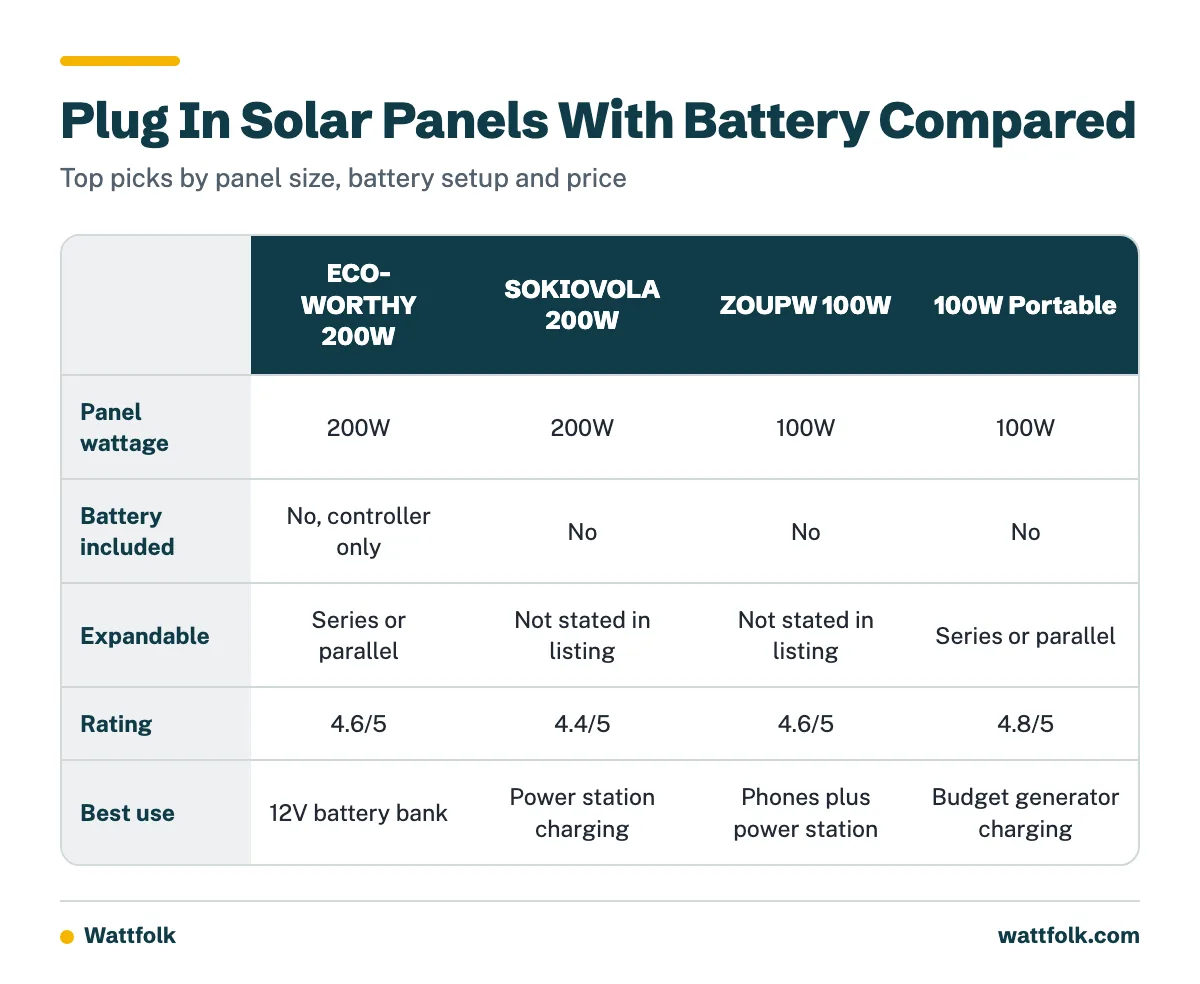
Battery and system comparison
| Product | Panel wattage | Battery included | Inverter output | Expandable | Certifications | Best use |
|---|---|---|---|---|---|---|
| ECO-WORTHY | 200W | No, controller only | None included | Series or parallel | Not stated in listing | 12V battery bank |
| SOKIOVOLA | 200W | No | None included | Not stated in listing | Not stated in listing | Power station charging |
| ZOUPW | 100W | No | None included | Not stated in listing | Not stated in listing | Phones plus power station |
| 100W Portable | 100W | No | None included | Series or parallel | Not stated in listing | Budget generator charging |
| 10W with Battery | 10W | Yes, 10400mAh | None (5V/12V DC only) | No | Not stated in listing | Outdoor cameras |
In-Depth Reviews

1. ECO-WORTHY 200W Solar Panel Kit – Best Overall
Our Verdict: The best starting point for a separate battery bank, because the charge controller is in the box and the panels can be wired for 12V or 24V.
The kit has two 100W monocrystalline panels, two sets of Z mounting brackets, a 30A solar controller, and a pair of 16.4 ft 10 AWG cables. The manufacturer cites up to 21.5% cell efficiency, 2400Pa wind load, and 5400Pa snow load, plus an IP65 junction box and corrosion-resistant aluminum frame.
At 200W and 12V, the nominal current is roughly 17A, which sits inside the 30A controller rating. That leaves headroom if you add a third panel in parallel, but check the controller’s input voltage limit before expanding. The controller is PWM, which is simpler and cheaper than MPPT but converts less efficiently when panel voltage is well above battery voltage. Wiring the panels in parallel for a 12V battery suits that design.
The kit has no battery, fuses, or inverter. You must add fusing on both sides of the controller and size the battery separately. It is better for a shed, cabin, camper, or fixed outdoor setup than for a renter who wants to carry the panels in and out.
Why We Like It
- Includes the charge controller that most batteries require.
- Series (24V) or parallel (12V) wiring options.
- Rigid aluminum frames with stated wind and snow ratings.
- 4.6/5 rating with 24/7 technical support from the seller.
Pros & Cons
Pros
- Controller and cables included
- Expandable wiring configuration
- Durable frame and sealed junction box
Cons
- PWM controller is less efficient than MPPT
- Battery, fuses, and inverter sold separately
- Rigid panels are not portable

2. SOKIOVOLA 200W Portable Solar Panel – Best Premium Output
Our Verdict: The strongest choice for owners of a portable power station with a high solar input limit and a mix of connector types.
This foldable panel is listed at 200W with 25% efficiency from Grade A+ 16BB cells and a weight of 11.47 pounds. It ships with a 3-meter 5-in-1 cable (XT60, Anderson, DC5521, DC7909, DC8020), three DC adapters, and an MC4 output. The listing also mentions QC3.0 and Type-C 65W ports, four kickstands, and IP67 protection.
The listing itself warns that many power stations cap solar input. If your unit accepts only 100W or 150W, the extra panel capacity goes unused. Check the station’s maximum input voltage and current as well, not just wattage. The seller offers a 12-month warranty and a 30-day refund window. Its 4.4/5 rating is the lowest of the larger panels here, so read recent reviews on connector fit before buying.
Why We Like It
- 200W of foldable capacity at under 12 pounds.
- Five connector styles plus adapters reduce compatibility problems.
- Built-in USB-C and QC3.0 ports for direct device charging.
Pros & Cons
Pros
- High wattage in a portable format
- Wide connector coverage
- Four-point kickstand angle adjustment
Cons
- Output limited by the power station’s input cap
- 4.4/5 rating trails the other large panels
- No charge controller for raw battery use

3. ZOUPW 100W Portable Solar Panel – Best for Portability
Our Verdict: A compact 100W panel that can charge phones directly or feed a power station.
The panel weighs 9.48 lbs and folds to 24.13 x 21.06 x 1.77 inches with a magnetic carry handle. It uses 23.5% efficiency monocrystalline cells with ETFE lamination and an IP67 rating. The 10 ft 5-in-1 cable covers DC8020 (Jackery), XT60 (EcoFlow, Anker), and other common plugs.
Its built-in controller powers one USB-C port (PD 15V/3A) and two USB-A ports, including QC3.0 12V/1.5A. That means a phone or tablet can charge without any battery. The listing notes that charging speed depends on the power station’s input limit. With 100W, expect a slow refill of a 1,000Wh class battery, so it suits small stations best. It has a 4.6/5 rating, a 12-month warranty, and lifetime technical support.
Why We Like It
- Three direct charging ports for devices.
- Lightweight with a carry handle and 10 ft cable.
- IP67 rating and ETFE surface.
Pros & Cons
Pros
- Lightest option in the roundup
- Direct USB charging
- Wide connector support
Cons
- 100W is slow for large batteries
- No expansion details in the listing

4. 100W Portable Solar Panel, 19.8V XT60 – Best Budget
Our Verdict: The lowest-cost route to power station charging, with the highest rating (4.8/5) in this group.
Listed at $64.59, this foldable panel outputs 19.8V at 100W through an XT60 connector. The listing says it supports 12V batteries up to 12A max and works with most portable power stations. It cites cell efficiency of up to 23.7%, ETFE lamination, IP65 protection, and an operating range of -10 to 70°C. A built-in smart IC is described as preventing reverse charging, overcharge, and overload.
The panels can be connected in series or parallel, and two units would double output. Confirm that your power station accepts XT60 input and a 19.8V panel. The listing does not name a certification body, so do not use it as a grid-tied or household circuit source.
Why We Like It
- Lowest price among the portable panels.
- Built-in protection against reverse current, as described by the seller.
- Series or parallel expansion.
Pros & Cons
Pros
- Strong 4.8/5 rating
- Low entry price
- Weatherproof ETFE surface
Cons
- XT60 only, so adapters may be needed
- 100W limits charging speed

5. 10W Solar Panel with 10400mAh Battery – Best for Security Cameras
Our Verdict: The only product here with a battery built in, but it is made for outdoor cameras and not for household backup.
The 10W monocrystalline panel feeds a 10400mAh battery with a 5V/12V slide switch. USB-C and three DC plugs (5.5×2.1mm, 4.0×1.7mm, 3.5×1.35mm) cover many camera inputs. The listing states it is not compatible with AC-powered cameras or PoE systems, and only one output port works at a time. Ratings include IP66 and an operating range of -20 to 70°C. Mounting hardware for walls and poles is included.
At $36.79 it is the cheapest option, but its 3.4/5 rating is the lowest in the group, so read recent complaints before buying. Confirm your camera’s voltage before connecting. It will not run a refrigerator or charge a laptop meaningfully.
Why We Like It
- Battery and panel in one unit.
- Switchable 5V or 12V output.
- Mounting hardware and IP66 rating.
Pros & Cons
Pros
- No separate controller needed
- Multiple camera plugs included
- Low price
Cons
- 3.4/5 rating
- Not for AC or PoE cameras
- Too small for household loads
Can plug in solar panels charge a battery?
They can, but only through a regulator. A raw panel can exceed a battery’s safe charging voltage, and without a charge controller it can overcharge the cells or push current the wrong way at night.
Can plug in solar panels work with a battery?
Yes, in two common ways. A power station has the controller built in, so you plug the panel into its solar input. A separate battery bank needs a charge controller between the panel and the battery. Many guides blur these two cases, and they have different wiring rules.
Do I need a battery for plug-in solar panels?
A battery is not inherently required. Without storage, the energy is used as it is produced or goes unused. A battery adds delayed use and backup. According to the plug-in solar consumer guide, solar-plus-battery setups can store energy for phone charging and limited refrigerator backup.
Power station or separate components?
- Power station: Panel, charge controller, battery, and inverter are in one case. Setup is simple, but you are limited to its solar input range and proprietary connectors.
- Separate system: Panel, controller, battery, and inverter are bought individually. It costs less per kWh and scales better, but you handle fusing, cable sizing, and wiring order.
What kind of battery do I need for solar panels?
For most small systems, choose a 12V LiFePO4 (lithium iron phosphate) battery, or a lead-acid deep-cycle battery if budget is tight. Match the battery voltage to the controller setting and confirm its maximum charge current.
- Chemistry: LiFePO4 typically allows deeper discharge and more cycles than lead-acid. Check the manufacturer’s rated cycle life and depth of discharge.
- Voltage: 12V suits small kits like the ECO-WORTHY. Higher voltages cut current and cable losses in larger systems.
- Capacity: Watt-hours equal volts times amp-hours. A 12V 100Ah battery is about 1,200Wh nominal.
- Charge limit: Make sure panel current does not exceed the battery’s maximum charge rate.
How do I connect solar panels, a battery, and an inverter?
The normal off-grid path is panel to fuse or breaker, charge controller, fuse or breaker, then battery. The battery connects to the controller first, then the panel. The inverter attaches directly to the battery through its own fuse. The step-by-step wiring guide from The Green Watt shows the same sequence.
How do I connect a solar panel to a battery?
- Cover the panel or work in low light so it produces no current.
- Fuse the battery positive and connect it to the controller’s battery terminals.
- Confirm the controller recognizes the battery voltage.
- Connect the panel through a fuse or breaker to the controller’s PV terminals.
- Attach the inverter to the battery with a short, fused, heavy cable.
With a power station, skip steps 1 to 4: plug the panel into the solar input and check the display for incoming watts.
How far can my solar panels be from the battery?
There is no single distance. Treat the three cable runs separately. Panel to controller carries higher voltage and lower current, so it tolerates longer runs. Controller to battery carries full charging current, so keep it short, and mount the controller near the battery. Battery to inverter carries the most current, so keep it as short as practical.
A common design target is about 2% to 3% DC voltage drop. Required wire size depends on current, one-way distance, round-trip distance, conductor material, and system voltage. The Renogy PV wire sizing guide explains the calculation.
As a safety check, a 2,000W inverter on a 12V battery can draw about 167A before efficiency losses, which needs very large conductors and proper overcurrent protection.
How big a battery do I need? A worked example
These numbers are illustrative planning figures, not measured results. Take a 200W panel and a 1,000Wh battery.
- Real panel output: Heat, angle, and controller losses often reduce output. Assume 75%, or about 150W.
- Charge time: 1,000Wh divided by 150W is about 6.7 hours of strong sun. At 4 peak sun hours per day, that is roughly 1.7 days.
- Usable AC output: At about 85% inverter efficiency, 1,000Wh yields roughly 850Wh.
- Runtime: A 60W average load would run about 14 hours on 850Wh.
Cloud, shade, and winter sun lengthen charging. For outage backup, add the running wattage of each device, then check the inverter’s surge rating. Motors in refrigerators can briefly draw several times their running power.
Compatibility checklist before you buy
- Voc (open-circuit voltage): Must stay below the controller or power station’s maximum input, with margin for cold weather.
- Vmp (maximum power voltage): Should fall within the controller’s working range.
- Isc (short-circuit current): Must be below the input current limit.
- Controller range: Check PV input voltage, charge current, and battery voltage settings.
- Battery voltage and chemistry: Set the controller profile to match.
- Connector type: XT60, Anderson, MC4, DC8020, and DC5521 are not interchangeable without adapters.
- Inverter wattage: Running load plus surge.
- Fuse rating: Size to the cable and the load, on both sides of the controller and at the battery.
Why is my solar panel draining my battery?
Work through these checks in order:
- Reverse current: Some controllers leak at night, and an incorrect setup can let current flow back to the panel. Check for a blocking diode or controller with night protection.
- Controller settings: Wrong battery type or voltage can stop proper charging.
- Standby loads: Inverters and connected devices draw power even when idle. Switch off the inverter when unused.
- Shading: A shaded cell can cut panel output sharply.
- Wiring faults: Loose terminals, corroded connectors, or undersized cable lose power as heat.
- Battery failure: If everything else checks out, test the battery’s capacity under load.
Safety, certification, and local rules
Charging a battery is different from feeding a household circuit. The consumer guide advises using equipment certified by UL or another nationally recognized testing laboratory, and checking building rules, HOA restrictions, and electric-meter compatibility before connecting to home circuits. Grid-connected systems need anti-islanding protection. The listings above do not state such certifications, so use them for battery charging only. For wiring basics, see the Essentra guide to wiring solar panels.
What do owners say?
Owners like
- Portable all-in-one battery systems are simple to set up when panels use the supplied solar input.
- Quiet, fuel-free emergency power for phones, laptops, lights, and small appliances.
- Expandable batteries and extra solar inputs extend runtime without replacing the main unit.
Common complaints
- Advertised battery capacity overstates the energy available to AC appliances because of inverter and conversion losses.
- Solar charging is slow in cloudy weather, winter, shade, or with an undersized array.
- Proprietary connectors, pricey expansion batteries, and limited third-party panel compatibility.
- High-power appliances can trigger inverter overload or surge protection even when running wattage looks fine.
- Some report inaccurate battery-percentage readings or unexpected standby drain.
Summarised from owner reviews and long-term user reports; individual experiences vary.
Frequently Asked Questions
Why do solar panels need batteries?
They do not always need them. A battery stores surplus energy for night use or outages. Without one, power is used immediately or wasted.
Do plug-in solar panels have battery storage?
Usually not. The panels only generate power. Storage comes from a separate battery, a power station, or a product like the 10W camera panel with its built-in 10400mAh battery.
Can plug in solar panels work with a battery?
Yes, through a charge controller or a power station’s solar input, as described above.
What kind of battery is needed for solar panels?
A deep-cycle battery, typically LiFePO4 or lead-acid, with voltage matched to your controller and a charge current rating above your panel current.
How far can my solar panels be from battery?
Distance depends on cable size and current. Keep the controller-to-battery and battery-to-inverter runs short, and aim for 2% to 3% voltage drop.
Conclusion
For a separate 12V battery, the ECO-WORTHY 200W kit is the best overall pick because it includes the controller. The SOKIOVOLA 200W suits larger power stations, the ZOUPW 100W is the most portable, the 100W XT60 panel is the budget choice, and the 10W panel with battery fits outdoor cameras only. Match voltage, current, and connectors first, size the battery from usable watt-hours, and confirm local rules before connecting anything to household wiring.
Sources
Affiliate Disclosure: As an Amazon Associate, we may earn commissions from qualifying purchases from Amazon.com. This comes at no extra cost to you and helps support our research.