

An MPPT solar charge controller continuously adjusts the solar array’s operating point to extract near-maximum power, then converts it to the voltage and current your battery needs. The decision that matters most is fit: choose a model whose maximum PV voltage stays above your array’s cold-weather open-circuit voltage, and whose charging current and voltage settings match your battery bank and chemistry.
This guide covers five controllers, from a 15A entry unit to an 80A and a 100A unit. It also explains sizing, lithium settings, setup, and troubleshooting. Product details come from the Amazon listings, and ratings are the listed Amazon averages.
Quick answer
Most 12V or 24V systems are well served by the Victron SmartSolar 100/50. Match array Voc to the PV limit first, then charging current. Lithium needs adjustable charge settings plus a battery BMS.
- Best for mid-size 12V/24V arrays: Victron 100/50
- Best for compact installs: Renogy Rover 2
- Best for 48V banks: Epever TEP8415
- Best for small budgets: Victron 75/15
Our Winner: Victron Energy SmartSolar MPPT Solar Charge Controller 100V, 50A, 12/24V
It pairs a 100V PV input with 50A of charging current, which covers roughly 700W of panels on a 12V bank and about 1,400W on 24V (current multiplied by charging voltage). The VictronConnect app, load output, and synchronized multi-unit charging make it the most flexible option here. It also has the highest Amazon rating among the higher-current models.
How We Compared These Models
Based on the listing specifications, we compared four criteria: maximum PV voltage, maximum charging current, battery chemistry and voltage support, and monitoring or configuration options. PV voltage protects the hardware, current sets how much power reaches the battery, and chemistry support decides whether lithium can be charged correctly. Amazon ratings are shown for context only.
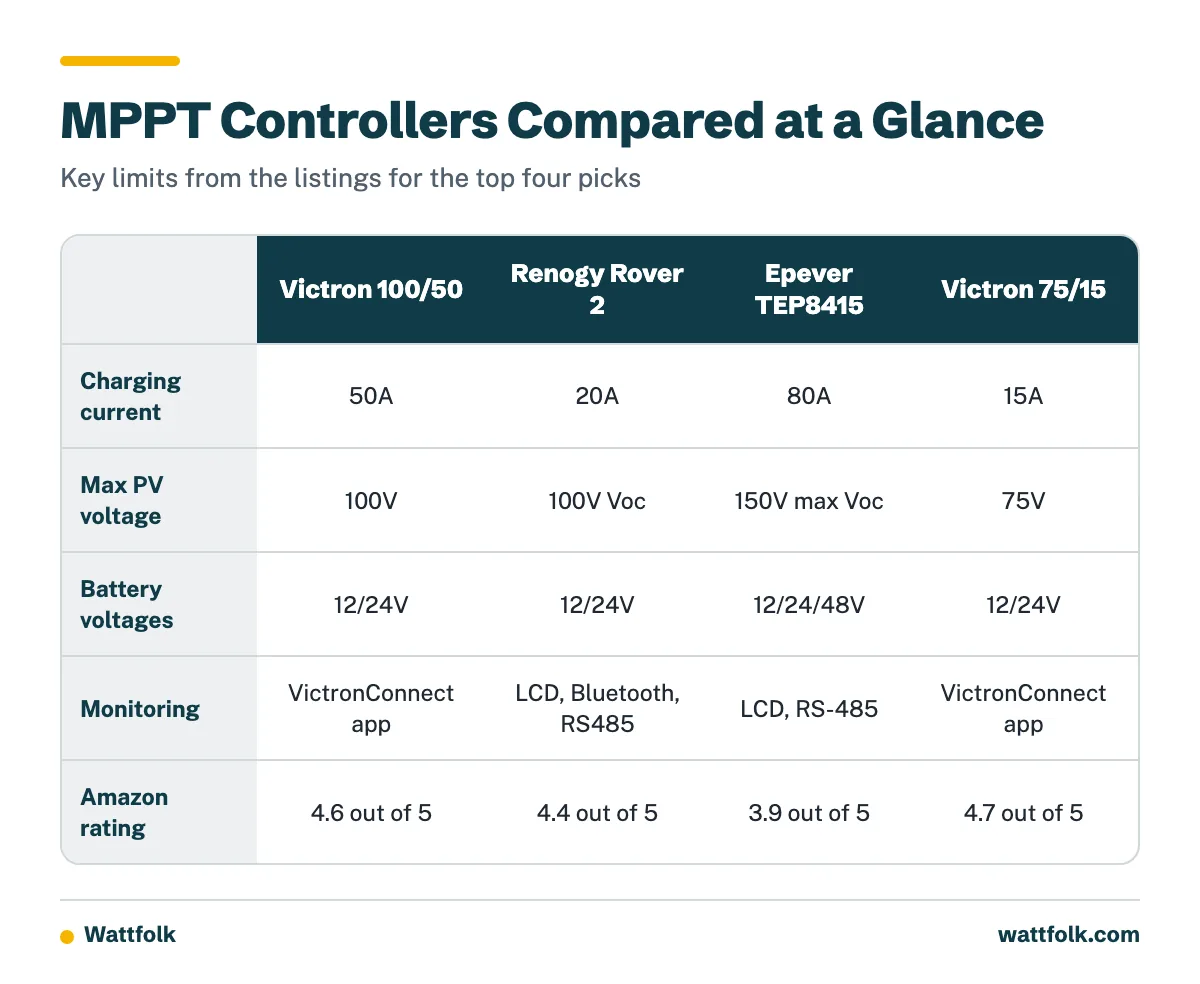
| Product | Key Specs | Our Choice | Action |
|---|---|---|---|
| Victron SmartSolar 100/50 | 12/24V, 50A, 100V PV, VictronConnect app, load output | Best Overall | |
| Renogy Rover 2 20A | 12/24V, 20A, 100V Voc, LCD, Bluetooth, RS485 | Best for Compact Installs | |
| Epever TEP8415 80A | 12/24/48V, 80A, 150V max Voc, LCD, RS-485, fan cooled | Best for 48V Systems | |
| Victron SmartSolar 75/15 | 12/24V, 15A, 75V PV, VictronConnect app, load output | Best Budget | |
| 100A MPPT Controller with LCD | 12/24V auto-detect, 100A, LCD, 12-month warranty, PV limit not listed | Best Value High-Current |
What Is an MPPT Solar Charge Controller?
An MPPT (maximum power point tracking) solar charge controller sits between the panels and the battery. It finds the voltage and current combination where the array produces the most power, then converts that power to a safe battery-charging voltage.
It also handles charge stages, protections such as reverse polarity and over-temperature, and in many models a load output.
How Does an MPPT Solar Charge Controller Work?
The controller samples the array and shifts its operating point as sunlight, temperature, and shading change. A DC-DC converter then steps the higher panel voltage down to battery voltage, and the current rises as the voltage falls.
For example, an array operating near 36V and 10A delivers about 360W. Into a 12V-class battery at roughly 14V, that is around 25A of charging current before conversion losses.
What Does an MPPT Controller Do That a PWM Controller Cannot?
A PWM controller pulls the array voltage down to the battery voltage, so the panels do not operate at their maximum power point. An MPPT controller lets the array run at a higher voltage, which allows longer series strings, thinner PV wiring, and better harvest in cold weather or partial shade.
The price premium is justified for arrays above a few hundred watts, long cable runs, or 24V and 48V strings feeding a lower-voltage battery. For a single small panel on a short run, PWM can be adequate.
What Size MPPT Solar Charge Controller Do I Need?
Check two limits: the controller’s maximum PV input voltage, and its maximum battery charging current. Many guides size only by nominal panel watts and skip both calculations. Also confirm the model’s maximum PV input power rating in its manual, because it is a separate limit from output amps.
Step 1: Calculate charging current
Divide array watts by battery voltage, then add design headroom (25% is a common margin). The table uses nominal battery voltage for simplicity. Real charging voltage runs higher, which lowers the current slightly.
| Array Watts | 12V Bank | 24V Bank | 48V Bank |
|---|---|---|---|
| 300W | 25A (about 31A with headroom) | 12.5A (about 16A) | 6.3A (about 8A) |
| 600W | 50A (about 63A) | 25A (about 31A) | 12.5A (about 16A) |
| 1,000W | 83A (about 104A) | 42A (about 52A) | 21A (about 26A) |
| 1,600W | 133A (about 167A) | 67A (about 83A) | 33A (about 42A) |
A 600W array on a 12V bank can approach 50A, so a 60A-class controller may be appropriate once its PV limits check out. Moving the same array to 24V roughly halves the current.
Step 2: Check cold-weather Voc
Panel open-circuit voltage (Voc) rises as temperature falls. Multiply the panel Voc by the number of panels in series, apply the temperature correction from the panel datasheet, and compare the result with the controller’s maximum PV voltage.
Illustrative example: three panels in series, each with a Voc of 22.5V, give 67.5V at standard test conditions. Assuming a Voc coefficient of -0.30% per °C (use your panel’s datasheet value), a -10°C morning is 35°C below the 25°C reference. That adds about 10.5%, so 67.5V becomes roughly 74.6V.
That result leaves almost no margin on a 75V controller, so a 100V model is the safer choice. Never exceed the PV voltage rating, because overvoltage can damage the controller.
How Do I Choose an MPPT Controller for a 12V Battery System?
For a 12V bank, prioritize charging current, since current is high at low voltage. Pick a controller whose amp rating covers your array watts divided by roughly 12V, with headroom, and confirm it supports 12V operation.
All five models here list 12V support. Above about 600W, consider a 24V bank to keep current, cable size, and fuse ratings manageable.
Which Controller Class Fits My System?
| Class | Typical Use | Models Here |
|---|---|---|
| 10A to 20A | Small RV, van, boat, backup panels | Victron 75/15, Renogy Rover 2 |
| 30A to 50A | Mid-size RV, cabin, 12V/24V banks | Victron 100/50 |
| 70A to 200A | Large off-grid, 48V banks | Epever TEP8415, 100A LCD unit |
Victron’s MPPT RS range, designed for 48V banks with roughly 65V to 450V PV input and 100A or 200A models, sits above this class for large systems.
Can an MPPT Solar Controller Charge a Lithium Battery?
Yes, if the controller supports your lithium chemistry and lets you set charge voltages that match the battery maker’s specification. A preset label is not enough: check for adjustable absorption and float voltage, temperature protection, and a low-temperature charge cutoff.
The battery’s own battery management system (BMS) is still required. A compatible controller does not replace the BMS.
- Flooded lead-acid: needs periodic equalization and ventilation.
- AGM and gel: use the maker’s absorption and float values, and enable equalization only if the manufacturer allows it.
- LiFePO4 and other lithium: no equalization, and charging below freezing may be unsafe without cell heating.
How Do I Set Up and Configure an MPPT Solar Charge Controller?
Connect the battery first so the controller can detect system voltage, then set battery type and charge parameters, and connect the PV array last. Victron’s documentation states that voltage detection occurs at first power-up with a short delay before charging begins, and later voltage changes may require manual configuration. See the Victron configuration and settings guide for model-specific steps.
- Confirm battery voltage and chemistry.
- Set absorption, float, and equalization values from the battery datasheet.
- Set the low-temperature cutoff for lithium.
- Set load disconnect voltage if you use the load output.
- Check the display or app for charge state, PV voltage, and current.
Pre-power checklist
- Battery connected first, through a correctly rated fuse placed close to the battery positive.
- Polarity verified with a meter on both battery and PV leads.
- Cable gauge matched to current and run length, and terminals torqued to spec.
- PV disconnect or breaker open until the battery is connected.
- Battery chemistry and charge voltages configured.
- Low-temperature lithium shutdown set or confirmed.
- Controller mounted with ventilation clearance and grounded per the manual.
Why Is My MPPT Solar Charge Controller Not Working?
Most no-charge complaints trace back to the system rather than the controller. Check these first:
- No charge: measure PV voltage at the controller, confirm battery voltage, test fuse continuity, and recheck polarity.
- Low output: look for shading, a PV voltage near the battery voltage, or undersized wiring.
- Overvoltage error: compare cold-weather Voc with the PV limit.
- Battery not detected: a deeply discharged battery may be below the detection threshold, so charge it first.
- Overheating: clear airflow around the unit and check for current above its rating.
- Communication problems: verify app, Bluetooth, or RS485 settings before suspecting a fault.
What Should I Check in an MPPT Solar Charge Controller Manual?
Confirm the maximum PV voltage, maximum PV power per battery voltage, charging current, supported chemistries, and whether lithium parameters are adjustable. Also check battery-voltage detection behavior, equalization defaults, temperature compensation, and fuse and cable recommendations. The Victron SmartSolar MPPT manual is a good example of a model-specific limits table.
Where Can I Find a Reliable MUST MPPT Solar Charge Controller Manual PDF?
Start with the manufacturer or the seller’s product page, and match the exact model number. A third-party copy such as the MUST ENERGY 80A MPPT user manual describes support for 12V, 24V, 36V, and 48V systems, with manual selection required for 36V, and lists lithium among supported battery types.
Always verify revision and limits against the label on your unit.
In-Depth Reviews

1. Victron Energy SmartSolar MPPT 100V, 50A, 12/24V – Best Overall
Our Verdict: The best balance of PV headroom, charging current, and configurability for most 12V and 24V systems, with a 4.6 out of 5 Amazon rating.
Based on the listing, the 100V input allows longer series strings, and the 50A output handles roughly 700W on a 12V bank by current times voltage. Settings, battery presets, firmware updates, and alarms are managed through the VictronConnect app, and the listing mentions 30-day performance history. The listing describes a configurable load output with low-voltage disconnect.
Multiple units can synchronize charging, which suits expanding systems. The product data lists no built-in LCD, so monitoring depends on the app.
Why We Like It
- 100V PV limit gives cold-weather margin on typical strings.
- App-based presets and detailed configuration.
- Synchronized charging across multiple controllers.
- Load output with adjustable low-voltage disconnect.
Pros & Cons
Pros
- Strong rating and flexible configuration
- Covers 12V and 24V banks
- Scales with synchronized units
Cons
- No LCD listed, app needed for details
- Not for 48V banks

2. Renogy Rover 2 MPPT 100V 20A 12V/24V – Best for Compact Installs
Our Verdict: A small, display-equipped controller for vans, boats, and cabins with modest arrays, rated 4.4 out of 5.
The listing describes the unit as 53% smaller than the previous generation, with an LCD and built-in Bluetooth. It supports arrays up to 100V Voc, and the listing cites 300W on 12V and 600W on 24V. Lithium, AGM, gel, and flooded batteries are supported, plus user-defined profiles.
Parallel linking and an RS485 port allow expansion. At 20A, it is a fit for smaller systems, not for large 12V arrays.
Why We Like It
- LCD plus Bluetooth with no external dongle.
- User-defined charge profiles for lithium.
- Parallel expansion for growing systems.
Pros & Cons
Pros
- Compact footprint
- Display and app monitoring
- Broad chemistry support
Cons
- 20A limits 12V array size
- Paralleling adds cost

3. Epever TEP8415 80A MPPT 12V/24V/48V – Best for 48V Systems
Our Verdict: The pick for larger banks, especially 48V, though its 3.9 out of 5 rating is the lowest of the group.
The listing cites 80A output and up to 4,160W on a 48V bank, with tracking efficiency of 99.5% or higher as stated by the manufacturer. The maximum PV open-circuit voltage is 150V at the lowest temperature, which allows longer strings. It supports AGM, gel, flooded, LiFePO4, and NCM batteries with a configurable three-stage profile.
It has a metal housing, IP20 rating, fan-cooled heat sink in a split chamber, an LCD, and an isolated RS-485 port. The fan adds noise and a maintenance point.
Why We Like It
- 12V, 24V, and 48V support in one unit.
- 150V PV limit for longer series strings.
- LCD configuration plus RS-485 expansion.
Pros & Cons
Pros
- High current and voltage capacity
- Lithium and lead-acid profiles
- Metal housing
Cons
- Lowest Amazon rating here
- IP20 means indoor mounting only
- Fan cooling

4. Victron Energy SmartSolar MPPT 75V, 15A, 12/24V – Best Budget
Our Verdict: The best entry point for a small system, with the highest Amazon rating in this group at 4.7 out of 5.
At 15A, it handles roughly 200W on a 12V bank and about 430W on 24V, by current times charging voltage. It shares the VictronConnect app, battery presets, load output, and synchronized charging with the 100/50.
The 75V PV limit is the main constraint. As the Voc example above shows, a three-panel series string can approach that limit in cold weather, so verify your string before buying.
Why We Like It
- Same app and configuration depth as larger Victron units.
- Suited to one or two small panels.
- Synchronized charging for later expansion.
Pros & Cons
Pros
- Top-rated in this group
- Low entry cost
- Configurable load output
Cons
- 75V PV limit restricts string length
- 15A caps array size

5. 100A MPPT Solar Charge Controller with LCD – Best Value High-Current
Our Verdict: The lowest-cost route to a 100A rating, but the listing leaves key limits unstated, so verify them before purchase. Rated 4.2 out of 5.
The listing describes 12V/24V auto-recognition, an LCD for adjusting settings including lithium, up to 99% efficiency, and protection against overcharge, short-circuit, and reverse polarity. The seller offers a 12-month warranty and lifetime technical support.
The title does not name a brand, and the data does not list the maximum PV voltage. Confirm that figure and your cold-weather Voc before connecting an array. Connect the battery first, as the listing advises, so auto-detection works.
Why We Like It
- Very high current rating at a low price.
- LCD adjustment for lithium settings.
- Warranty and support terms stated in the listing.
Pros & Cons
Pros
- Lowest price per amp
- Auto voltage recognition
- Display with adjustable settings
Cons
- Max PV voltage not listed
- No brand named in the title
- No app or communications port listed
Frequently Asked Questions
What size MPPT solar charge controller do I need?
Divide array watts by battery voltage, add about 25% headroom, and confirm the controller’s PV voltage and power limits. A 600W array on 12V needs roughly a 60A-class unit.
Can a MPPT solar controller charge a lithium battery?
Yes, when it supports your chemistry and allows adjustable voltages and temperature protection. The battery still needs its own BMS.
How do I set an MPPT solar charge controller?
Connect the battery first, select battery type and voltage, set absorption, float, and low-temperature limits, then connect the panels.
Why is my MPPT solar charge controller not working?
Check PV voltage, battery voltage, fuse continuity, polarity, and shading before blaming the unit. Then review communication and battery-detection settings.
Which MPPT solar charge controller is best for a 12V system?
The Victron 100/50 suits larger 12V arrays, while the Victron 75/15 and Renogy Rover 2 suit smaller ones. Size by current first.
Conclusion
Choose the Victron SmartSolar 100/50 for most 12V or 24V systems, the Epever TEP8415 for 48V banks, the Renogy Rover 2 for compact installs, and the Victron 75/15 for tight budgets. The 100A unit is worth considering only after you confirm its PV voltage limit.
Whichever you pick, calculate cold-weather Voc, size charging current from array watts, and set lithium parameters from the battery maker’s data.
Sources
Affiliate Disclosure: As an Amazon Associate, we may earn commissions from qualifying purchases from Amazon.com. This comes at no extra cost to you and helps support our research.